

CRASH REPORTER / SYSLOG
Il est important de savoir comment résoudre les problème de crash que les utilisateurs rencontre lors de l'installation de plusieurs tweaks Cydia sans avoir à restaurer son iPhone ou supprimer la totalités de vos tweaks Cydia préférer la procédure à suivre:
Installer l’un de ces 2 packages :
Pour l’utilisation de Syslog, il est conseillé d’installer le package
Crash Reporter
Suite à un crash ou une instabilité d’un tweak ou application de Cydia, lancer l’application


Ci-joint la fiche officiel du tweaks:
Overview
Crash Reporter is an application to ease submission of crash reports for both user and developer. It features
Usage
Whenever you suspect a crash, you can launch Crash Reporter:

which a screen like this will appear:
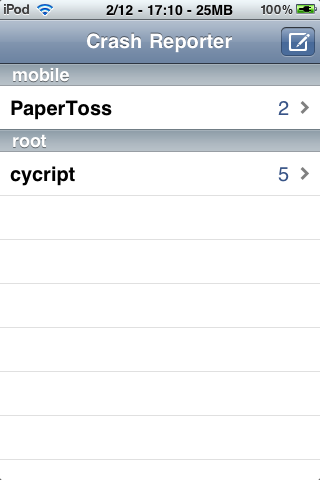
This screen contains all recently crashed applications.
Tap on a cell to reveal all crash logs of that application. The crash logs are sorted by date. Tap on one of them to analyze the crash log.
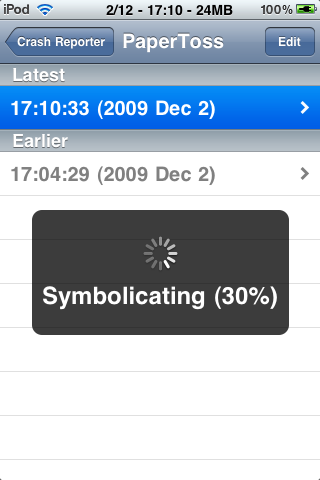
(Additionally, you can delete processed crash logs in this view.)
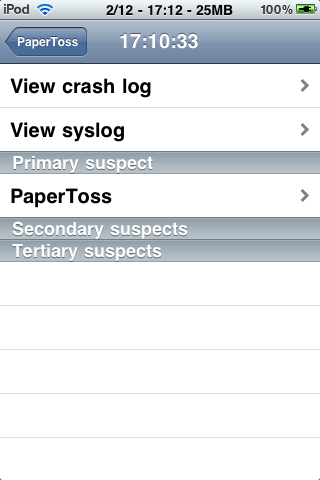
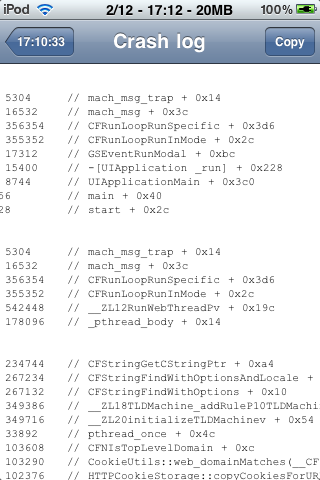
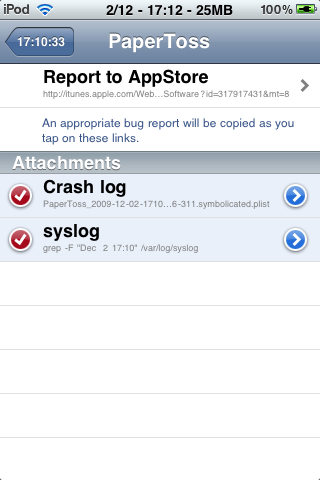
This brings us to the suspects view. In here, you can view the symbolicated crash log, and the syslog in the minute that the crash happened. Crash Reporter would analyze the crash log and identify the possible libraries that causes the crash. They are divided into 3 types:
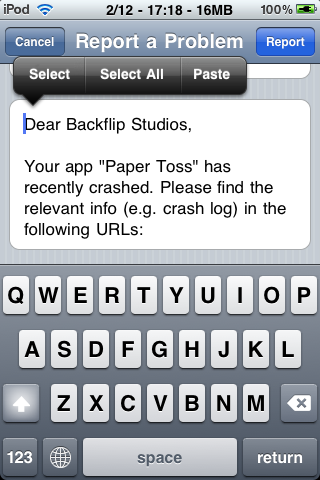
Knowing who to blame, you can now generate a report to its developer. By default, the first link will send you to AppStore or Cydia, where you can paste to the report/mail to the developer. At the time you tap on the link, the attachments (crash log and syslog) will be uploaded to pastie.org so that the developer can retrieve it later.
Il est important de savoir comment résoudre les problème de crash que les utilisateurs rencontre lors de l'installation de plusieurs tweaks Cydia sans avoir à restaurer son iPhone ou supprimer la totalités de vos tweaks Cydia préférer la procédure à suivre:
Installer l’un de ces 2 packages :
Vous devez être inscrit pour voir les liens ! Inscrivez-vous ou connectez-vous ici.
ou
Vous devez être inscrit pour voir les liens ! Inscrivez-vous ou connectez-vous ici.
(vous pouvez installer et utiliser ces 2 packages en même temps).Pour l’utilisation de Syslog, il est conseillé d’installer le package
Vous devez être inscrit pour voir les liens ! Inscrivez-vous ou connectez-vous ici.
de Cydia aussi.Crash Reporter
Suite à un crash ou une instabilité d’un tweak ou application de Cydia, lancer l’application
Vous devez être inscrit pour voir les liens ! Inscrivez-vous ou connectez-vous ici.
depuis le springBoard.- L’application vous liste les tweaks ou apps qui ont posé un souci.
- Vous pouvez ainsi consulter les rapports sur le crash, les logs du système, identifier le package causant éventuellement ce crash,etc.
- Aller dans « Find packages in Cydia ».
- Cela va générer le rapport de crash.
- L’application Cydia se lance et vous renvoit vers la fiche descriptive du tweak.
- compatible ios 6 et 7 testé et approuver

- dsl pour le scéen shot j'ai pas trouver meilleur
Ci-joint la fiche officiel du tweaks:
Overview
Crash Reporter is an application to ease submission of crash reports for both user and developer. It features
- Symbolication.
- Accurately finding which application/extension causes the crash.
- Developer-controlled diagnosis information (See
Vous devez être inscrit pour voir les liens ! Inscrivez-vous ou connectez-vous ici.).
Usage
Whenever you suspect a crash, you can launch Crash Reporter:
which a screen like this will appear:
This screen contains all recently crashed applications.
Tap on a cell to reveal all crash logs of that application. The crash logs are sorted by date. Tap on one of them to analyze the crash log.
(Additionally, you can delete processed crash logs in this view.)
This brings us to the suspects view. In here, you can view the symbolicated crash log, and the syslog in the minute that the crash happened. Crash Reporter would analyze the crash log and identify the possible libraries that causes the crash. They are divided into 3 types:
- Primary suspect is the first library in the stack trace of the crashing thread.
- Secondary suspects are libraries involved in the crashing thread.
- Tertiary suspects are those involved in the application at that time, but were not running in the crashing thread.
Knowing who to blame, you can now generate a report to its developer. By default, the first link will send you to AppStore or Cydia, where you can paste to the report/mail to the developer. At the time you tap on the link, the attachments (crash log and syslog) will be uploaded to pastie.org so that the developer can retrieve it later.
Dernière édition:


