
[Script] Mod Loader en 1.20

Statut
N'est pas ouverte pour d'autres réponses.

Boughhh

https://crystalmodding.net/
Premium
Inscription
1 Avril 2013
Messages
326
Réactions
82
Points
3 950
RGCoins
50
eITILgi.png


Important info:
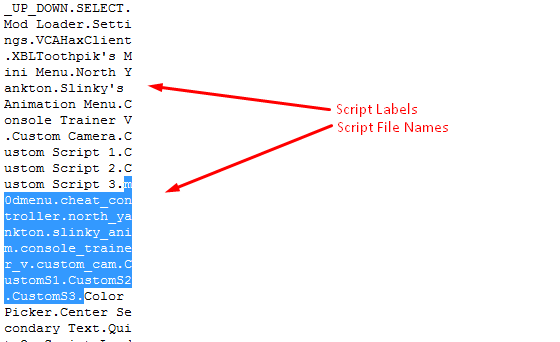
In order for the mod loader to work correctly, your script file name has to match the name given to the script . This name is located within the script in plain text: usually near the bottom and after the end of the coding, but before the padding starts in hexadecimal. These two names needs to match in order to terminate correctly, however if they do not match there should be no problems loading the script.

Some menus open and display the instant they are loaded with the mod loader. In the case you wish to open a script that does this, you will need to enable an option in the settings, Close on Script Load.

In the main menu—Mod Loader—scripts are highlighted based on their status.
nrq1wtB.jpg
Script file name does not exist.
KFo7yp7.jpg
Script exists but is not loaded.
vftgtom.jpg
Script exists and is loaded.

This is the list of scripts and the names that load them:
1LLwb11.jpg


Features
Main Menu:
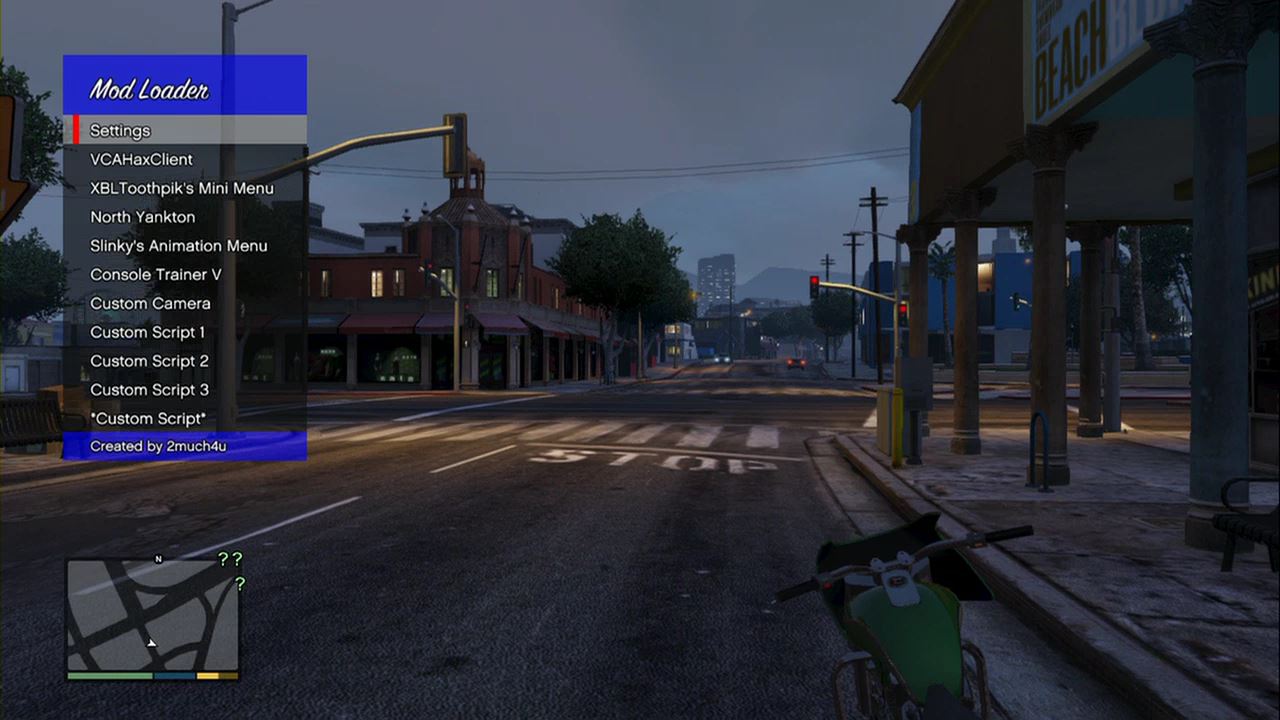
  • Settings
  • VCAHaxClient
  • XBLToothpik's Mini Menu
  • North Yankton
  • Slinky's Animation Menu
  • Console Trainer V
  • Custom Camera
  • Custom Script 1
  • Custom Script 2
  • Custom Script 3
  • Define Custom Script (this displays a keyboard and will allow you to load any script you wish to load by typing its filename* and pressing the start button. If you want to change the name of the script you can press X (or square) while the option is highlighted)

Settings:
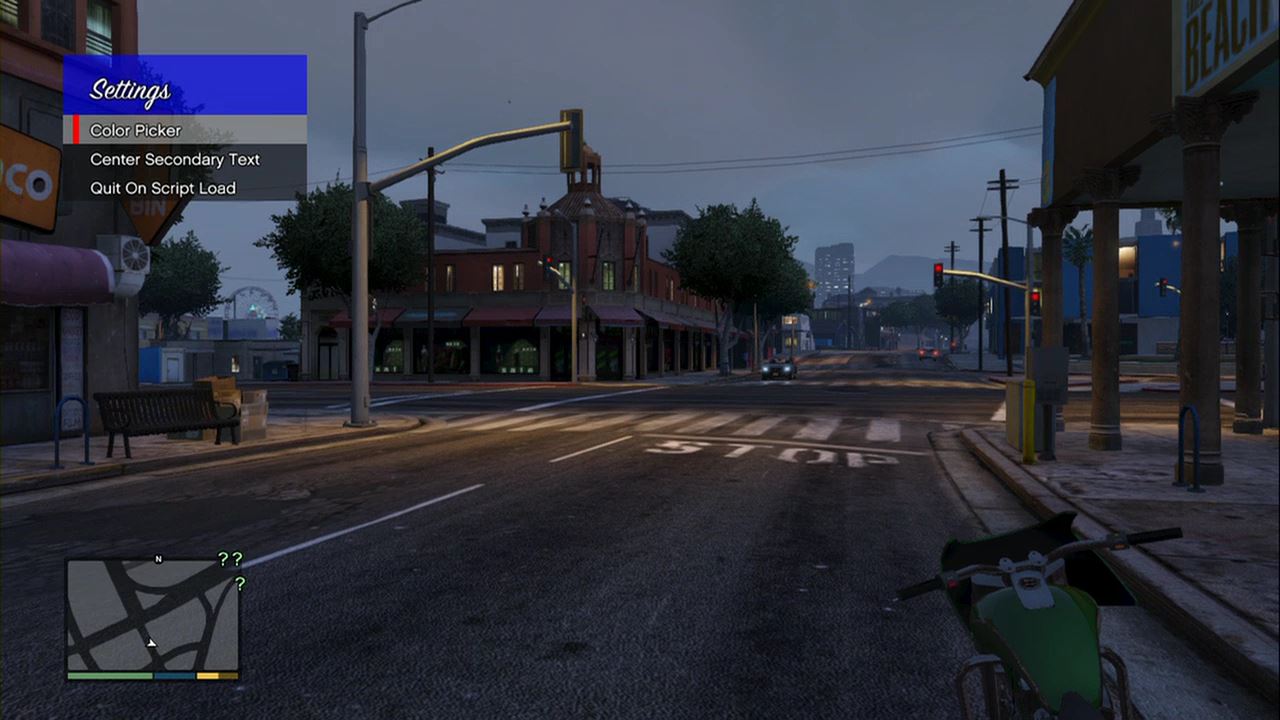
  • Color Picker
  • Center Secondary Text
  • Quit On Script Load

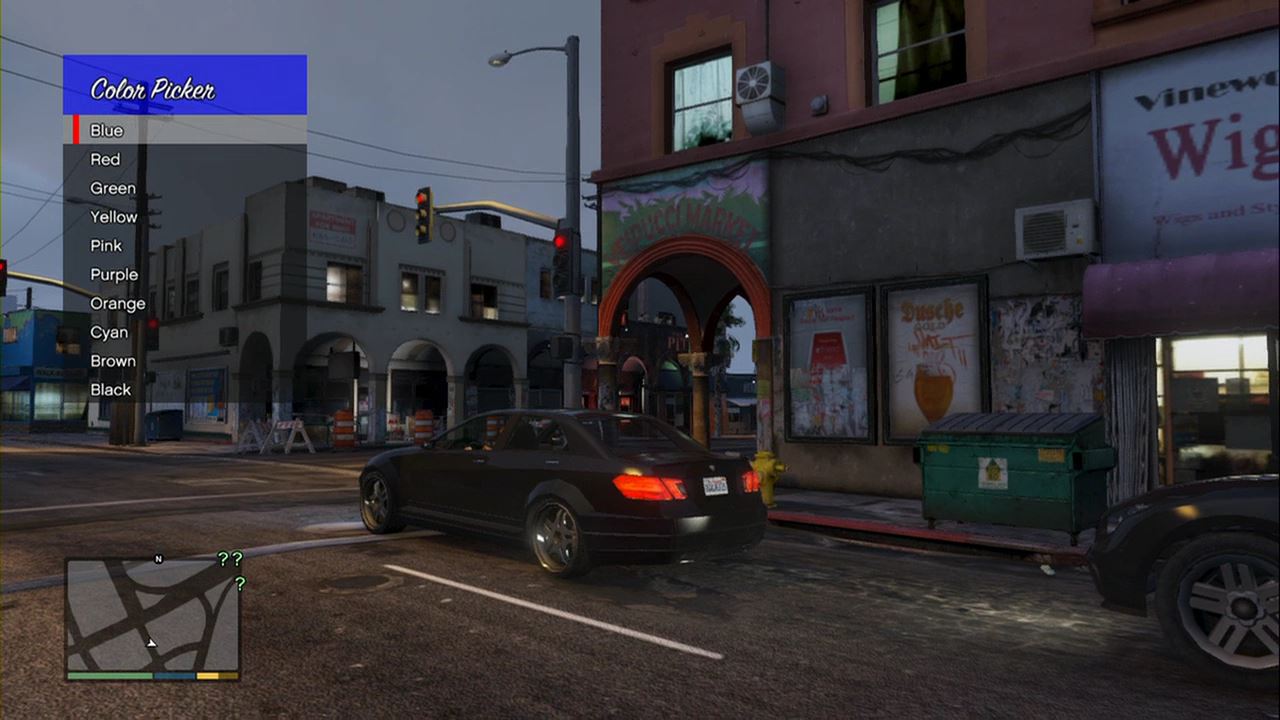
Color Picker:
  • Various colors for making the menu look sexy.


Controls:
Xbox: Open with X and LB
Ps3: Open with Square and L1

Installation
This can installed just like any other script. I personally rename it to emergencycall and put it in the script.rpf so that it will load when you call 911. This will work in online and singleplayer.


Pictures
Thanks to Aaron Renicks for these.


wXihTND.jpg


h2f8QHm.jpg


YKw3dBu.jpg


Credits:
HairyMineFart - The script editor, teaching me a ton and answering my questions.
Buffeting - Helping me troubleshoot and answering a few questions.
Awakening - Most of the design ideas.

For the editors:

quote_icon.png
Originally Posted by Father Kryptus
cX7vVV9.png

This can be done in a hex editor, most people use HxD.
The top section is what is displayed for that script. The bottom section is the corresponding file name in the script.rpf.

Example: I'll use North Yankton as an example.
Change the "North Yankton" label to whatever in the top section.
Change "north_yankton" to the name of the script you want, for example, if the script is "menu.csc", change "north_yankton" to "menu".

Hope this helps.
smile.gif


Source :
 
eITILgi.png


Important info:
In order for the mod loader to work correctly, your script file name has to match the name given to the script . This name is located within the script in plain text: usually near the bottom and after the end of the coding, but before the padding starts in hexadecimal. These two names needs to match in order to terminate correctly, however if they do not match there should be no problems loading the script.

Some menus open and display the instant they are loaded with the mod loader. In the case you wish to open a script that does this, you will need to enable an option in the settings, Close on Script Load.

In the main menu—Mod Loader—scripts are highlighted based on their status.
nrq1wtB.jpg
Script file name does not exist.
KFo7yp7.jpg
Script exists but is not loaded.
vftgtom.jpg
Script exists and is loaded.

This is the list of scripts and the names that load them:
1LLwb11.jpg


Features
Main Menu:
  • Settings
  • VCAHaxClient
  • XBLToothpik's Mini Menu
  • North Yankton
  • Slinky's Animation Menu
  • Console Trainer V
  • Custom Camera
  • Custom Script 1
  • Custom Script 2
  • Custom Script 3
  • Define Custom Script (this displays a keyboard and will allow you to load any script you wish to load by typing its filename* and pressing the start button. If you want to change the name of the script you can press X (or square) while the option is highlighted)

Settings:
  • Color Picker
  • Center Secondary Text
  • Quit On Script Load

Color Picker:
  • Various colors for making the menu look sexy.


Controls:
Xbox: Open with X and LB
Ps3: Open with Square and L1

Installation
This can installed just like any other script. I personally rename it to emergencycall and put it in the script.rpf so that it will load when you call 911. This will work in online and singleplayer.


Pictures
Thanks to Aaron Renicks for these.


wXihTND.jpg


h2f8QHm.jpg


YKw3dBu.jpg


Credits:
HairyMineFart - The script editor, teaching me a ton and answering my questions.
Buffeting - Helping me troubleshoot and answering a few questions.
Awakening - Most of the design ideas.

For the editors:

quote_icon.png
Originally Posted by Father Kryptus
cX7vVV9.png

This can be done in a hex editor, most people use HxD.
The top section is what is displayed for that script. The bottom section is the corresponding file name in the script.rpf.

Example: I'll use North Yankton as an example.
Change the "North Yankton" label to whatever in the top section.
Change "north_yankton" to the name of the script you want, for example, if the script is "menu.csc", change "north_yankton" to "menu".

Hope this helps.
smile.gif


Source :


sympa

sympa y a t il des mapmod
 
Dernière édition par un modérateur:
Pureee le copy past, mdr tu tes pas fouler ! ^^
 
comment on fait pour linstaller cest pas un update comment faire
 
J'ai compris avec google traduction mais comment on fait pour editer les script :/
Ps : mets un lien de telechargement avec le script modifier stp
 
eITILgi.png


Important info:
In order for the mod loader to work correctly, your script file name has to match the name given to the script . This name is located within the script in plain text: usually near the bottom and after the end of the coding, but before the padding starts in hexadecimal. These two names needs to match in order to terminate correctly, however if they do not match there should be no problems loading the script.

Some menus open and display the instant they are loaded with the mod loader. In the case you wish to open a script that does this, you will need to enable an option in the settings, Close on Script Load.

In the main menu—Mod Loader—scripts are highlighted based on their status.
nrq1wtB.jpg
Script file name does not exist.
KFo7yp7.jpg
Script exists but is not loaded.
vftgtom.jpg
Script exists and is loaded.

This is the list of scripts and the names that load them:
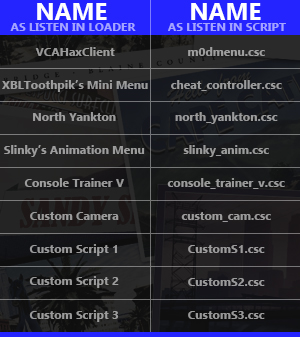
1LLwb11.jpg


Features
Main Menu:
  • Settings
  • VCAHaxClient
  • XBLToothpik's Mini Menu
  • North Yankton
  • Slinky's Animation Menu
  • Console Trainer V
  • Custom Camera
  • Custom Script 1
  • Custom Script 2
  • Custom Script 3
  • Define Custom Script (this displays a keyboard and will allow you to load any script you wish to load by typing its filename* and pressing the start button. If you want to change the name of the script you can press X (or square) while the option is highlighted)

Settings:
  • Color Picker
  • Center Secondary Text
  • Quit On Script Load

Color Picker:
  • Various colors for making the menu look sexy.


Controls:
Xbox: Open with X and LB
Ps3: Open with Square and L1

Installation
This can installed just like any other script. I personally rename it to emergencycall and put it in the script.rpf so that it will load when you call 911. This will work in online and singleplayer.


Pictures
Thanks to Aaron Renicks for these.

wXihTND.jpg


h2f8QHm.jpg


YKw3dBu.jpg


Credits:
HairyMineFart - The script editor, teaching me a ton and answering my questions.
Buffeting - Helping me troubleshoot and answering a few questions.
Awakening - Most of the design ideas.

For the editors:

quote_icon.png
Originally Posted by Father Kryptus
cX7vVV9.png

This can be done in a hex editor, most people use HxD.
The top section is what is displayed for that script. The bottom section is the corresponding file name in the script.rpf.

Example: I'll use North Yankton as an example.
Change the "North Yankton" label to whatever in the top section.
Change "north_yankton" to the name of the script you want, for example, if the script is "menu.csc", change "north_yankton" to "menu".

Hope this helps.
smile.gif


Source :
En francais stp?
 
Hmmm... Comment on l'installe ? (d)
Merci ;) du partage
 
slt tt le monde ;) j'ai une question , en ayant le modmenu installer sur ma play ( EBOOT.BIN + update ) je peut ouvrir un tool a coté ?? juste par curiosité :mmh:
 
Statut
N'est pas ouverte pour d'autres réponses.
Retour
Haut